
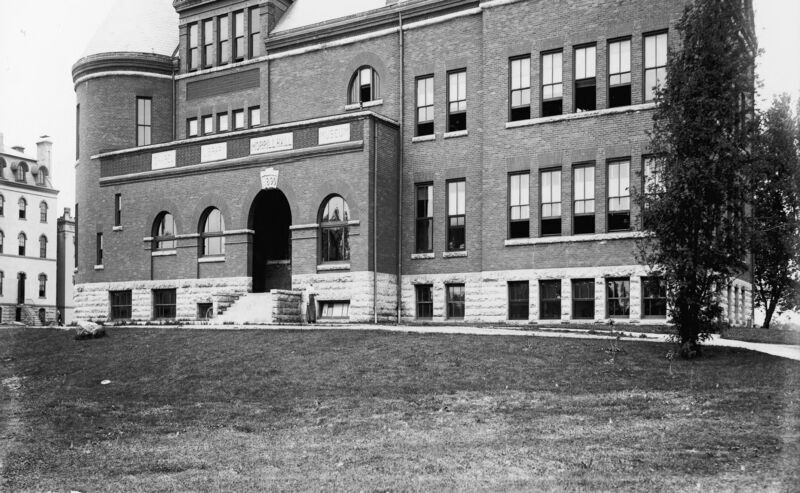
Morrill Hall
The Jewel of Iowa State
Contents: About CollectionBuilder CSV | About the About Page | Tech
About The Exhibit
This interactive exhibit was transcribed from a 2002 digital exhibit created by Iowa State University Library’s Special Collections Department. The original exhibit can be seen here. All photographic materials were taken from the university library archives, now known as Special Collections and University Archives (SCUA). The essay, “History of the Pipe Organ in Morrill Hall Chapel”, was written by Dennis Wendell.
The purpose of recreating this exhibit in CollectionBuilder is to make its content more discoverable and usable for current audiences. CollectionBuilder also allows readers to experience the exhibit in new ways, such as by browsing images or viewing them chronologically in a timeline.
Creators
This exhibit was created by Peter Kooger, a student in the University of Wisconsin-Madison Library and Information Science master’s program, and Olivia Wikle, the head of the Digital Scholarship and Initiatives department at Iowa State University Library.
The Project
Morrill Hall: The Jewel of Iowa State was recreated in CollectionBuilder as a part of Peter Kooger’s practicum with the library’s Digital Scholarship and Initiatives department. Olivia Wikle, the head of the department, served as practicum supervisor and assisted in the creation of the project. The website was built using CollectionBuilder’s CSV template.
Permissions
U.S. and international copyright laws protect these digital images. Commercial use or distribution of the images is not permitted without prior permission of the copyright holder. For permission to use the digital images, please contact Iowa State University Library Special Collections and University Archives at archives@iastate.edu.
This demo collection features items from the University of Idaho Library’s Digital Collections, and is build using CollectionBuilder-CSV.
CollectionBuilder-CSV is a “Stand Alone” template for creating digital collection and exhibit websites using Jekyll, given:
New sentence!
- a CSV of collection metadata
- a folder of images, PDFs, audio, or video files
Driven by your collection metadata, the template generates engaging visualizations to browse and explore your objects. The resulting static site can be hosted on any basic web server.
CollectionBuilder is an set of open source tools for creating digital collection and exhibit websites that are driven by metadata and powered by modern static web technology. See CB Docs for detailed information.

About the About Page
We want to make engaging interpretive pages easier to create, so CollectionBuilder gives you tools to write with your collection content!
The template comes with a customizable “About” page layout designed for long form content with rich media embeds. Content is written in Markdown and enhanced using “includes” that pull in collection content, external media, and Bootstrap features like cards and modals. We hope this makes it easier for site builders to develop the collection AND add interesting and engaging contextual information.
Each “include” file has several options, which are documented in the files themselves–copy the examples to see how it works with your content! In the demo below, we’ve given display widths of 25% and 50% to save space, but you can feature the entire image or document.
You can also see a page featuring a bonanza of feature includes options on our CollectionBuilder-GH demo site.
Include Collection Items
The template provides includes to pull your collection objects and metadata into your interpretive page, allowing you to write with your materials directly embedded in the content.
Include an Image
- Image –>
{% include feature/image.html objectid="demo_001" width="75" %}
Include a PDF
- PDF – >
{% include feature/pdf.html objectid="demo_002" width="50" %}
Include a Video
- Video:
{% include feature/video.html objectid="demo_004" %}
Include an Audio File
- Audio:
{% include feature/audio.html objectid="demo_003" %}
Include Bootstrap Features
The template also provides includes to make it easier to add Bootstrap components to your Markdown writing. These features allow you to better organize and highlight your content.
Include a Card
- Card – >
{% include feature/card.html header="This is a Card" text="The card features an image from the collection as a cap" objectid="demo004" width="25" centered=true %}
This is a Card
The card features an image from the collection as a cap
Include a Button
- Buttons – >
{% include feature/button.html text="Button Link to Somewhere" link="https://collectionbuilder.github.io/" color="success" %}
Include an Alert
- Alerts – >
{% include feature/alert.html text="this is an *alert* that 'warns' a user" color="warning" align="center" %}
This is an alert that ‘warns’ a user with centrally aligned text.
Include a Modal
- Modals – >
{% include feature/modal.html button="This is a modal using a 'primary' colored button to invite clicking" title="when clicked:" text="A Modal will pop out a box with some more information" color="primary" %}
Technical Credits - CollectionBuilder
This digital collection is built with CollectionBuilder, an open source framework for creating digital collection and exhibit websites that is developed by faculty librarians at the University of Idaho Library following the Lib-Static methodology.
Using the CollectionBuilder-CSV template and the static website generator Jekyll, this project creates an engaging interface to explore driven by metadata.